I had to fix ACL's across 180 servers to address Replication issues stemming from our UEM - here's what I learned

File Permissions. Access Control. NTFS Permissions. ACL's. Whatever you want to call them, if you're in IT - there's a chance you've had to deal with them - and very likely within a Windows environment.
For the longest time, my entire experience with granting someone access to folder was checking their AD account from within my org and matching whatever permissions were needed - of course with the concept of least privilege applied. You'd also get a head shake from me when I noticed users directly added to a folders ACL's (hint: bad). This is the typical Service Desk > SysAdmin experience - at least in our branch.
Now that I'm an Endpoint Engineer - I get to expand the thought beyond immediate solutions. And so, comes the challenge.
We'll define ACL's as the list of users and groups that have permissions to read, write, execute, modify, and/or fully control a directory or file.
Now, recently, I was tasked with harmonizing the ACL's across 180+ Ivanti Preferred Servers so that we didn't have as much of a variation in our expected standards ~ at the time, we definitely had a consistency problem with ACL's.
So, I wanted to take the time I put into my solution, and talk some quick pointers and cliff notes on stuff I learned - from the technical, to the planning, to the big picture stuff (⓿_⓿).
BUILTIN versus NT AUTHORITY
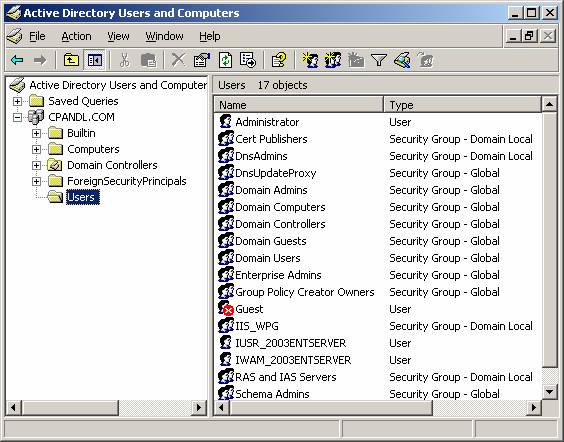
In order to harmonize, I had to think about ALL groups within the directory Ivanti cared about - not just the AD Groups that would make Ivanti play nice. If we were going to be touching ACL's, we might as well clean the rest of them up. And so, I had to pull the ACL's on each directory - some of which would include BUILTIN and NT AUTHRITY Groups.
If these sound like system level groups, you would be correct.
BUILTIN Groups These are default groups built-into the systems OS. It is a list of predefined groups that every Windows OS will create as a part of the install. Each role has a different functionality, and provide us a basic framework from which to start from.
Example Groups:
BUILTIN\Administrators: Members of this group have full control over the system.BUILTIN\Users: This group includes standard user accounts. Members have more restrictions compared to the Administrators group.BUILTIN\Remote Desktop Users: Members of this group are granted the right to log on remotely.
NT AUTHORITY Groups:
These are groups are less obvious and interactive then BUILTIN - in fact, the NT AUTHORITY group grants the OS access to to perform System-Level tasks. They aren't meant for users, but for processes/services/tasks within the OS.
Example Groups:
NT AUTHORITY\SYSTEM: This is the MOST powerful account in the System - above evenBUILTIN\Administrator. It's OP! It has unrestricted access to the entire system. This group is used to run core system services.NT AUTHORITY\NETWORK SERVICE: The NETWORK SERVICE account has permissions similar to those of an authenticated user account. This means it has fewer rights on the local system. It's commonly used for services that require network access but don't need to run with the full privileges of the Local System account - like web servers or DNS servers.
Handy ACL code snippets
In a Powershell environment, these quick and dirty commands are key 🔑.
icacls.exe is a built-in cmdlet utility introuduced in the Windows Server 2003 and Windows XP Professional x64 Edition - WOW - and also.. it still works great. Because it's a cmdlet - it's more portable and purpose specific.
Get-ACL / Set-ACL tools were introduced in the Windows Server 2008 and Windows Vista timeline - and since it's a Powershell tool, it can leverage all of the advanced scripting functionality of Powershell.
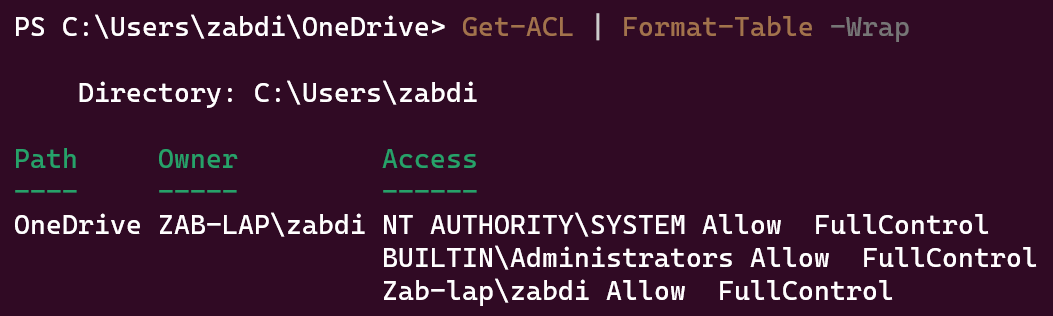
Quickly Pull ACL Groups of a specific directory or file
icacls <directory>

Do the same with Get-ACL!
Get-ACL | Format-Table -Wrap
A quick and dirty logging function - not necessarily ACL related, but logging is important
function Write-Log {
    [CmdletBinding()]
    param (
        [Parameter(Mandatory=$true)]
        [string]$Message,

        [Parameter(Mandatory=$true)]
        [string]$Path,

        [string]$Level = "INFO"
    )

    # Get the current timestamp
    $timestamp = Get-Date -Format "yyyy-MM-dd HH:mm:ss"

    # Create the log message
    $logMessage = "$timestamp [$Level] $Message"

    # Append the log message to the file
    Add-Content -Path $Path -Value $logMessage
}
Output example:

Check for inheritance
$acl = Get-Acl -Path C:\testfolder\
$acl.Access | Select-Object IdentityReference,IsInherited
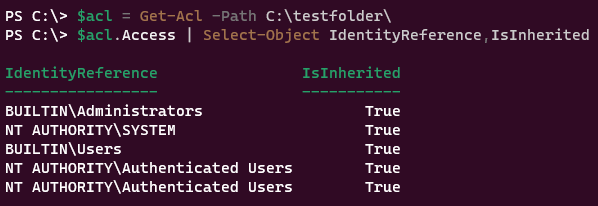
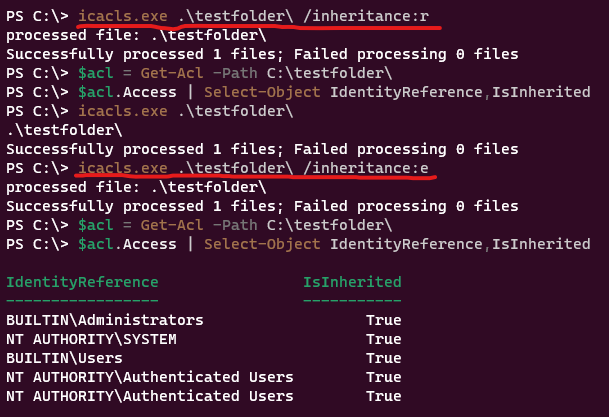
- Remove inheritance from a single folder - not recursively + Enable inheritance from a single folder - not recursively
# remove inheritance
icacls.exe .\testfolder\ /inheritance:r
#enable inheritance
icacls.exe .\testfolder\ /inheritance:e
 Quickly change the owner of a folder - recursively
icacls "C:\testfolder" /setowner "DOMAIN\User-or-Group" /T
Consult with your Colleagues and SME's - if you're in a great place, we'll call them friends

I'll keep this one short. It's easy for pride to take the wheel. When working on big scale changes - take your time in mapping out your flow, and then list every question you can.
For the questions you feel iffy about - ask your friends For the questions you feel almost 90% confident in, ask your friends if it's the right way. For the topics you've nailed down 100% - ask your friends to review.
It might be different in your environment. Maybe you're expected to keep your head down. If that's the case, I truly am sorry. But I can promise you, you'll never get better solutions than collaborating with your friends - they can turn stones over that you never knew existed.
I made the mistake of collaborating in crucial parts of the project - which meant I actually had to work a little longer than usual because my colleague pointed out holes I was too tunnel visioned to see. (┬┬﹏┬┬)
Don't celebrate early
Sometimes you hit a milestone, and you start babbling nonsense. "I think a couple more hours and this can go into validation/prod."
Stop it. Keep the timetable realistic. It'll be better for you and the team. Don't underestimate life's ability to provide roadblocks for you.
Using multiple tools is fine
- Active Directory
- Batchpatch.exe
- Powershell
- Ivanti
- File Share
- VS Code
- Powershell ISE
- GPT4
- Bing Chat
- Excel
Use the best tool for the job - and explore your options. Don't limit yourself unless there's a good reason to.
Always baseline your environment, always create a test environment
In my case, the changes could take 6+ hours per server, since the directories we are talking about potentially sit in the 100K+ range - and we weren't just doing simple ACL changes.
With a length like this, some concerns should pop up into your head.
Is there anything that could interrupt the ACL script? Do these servers have a daily reboot timer? Are there any scheduled maintenance coming up for these servers? Can the servers handle the load while also running it's other business critical functions?
It's pertinent to ask the questions to key stakeholders, to owners of this environment, and to your own team.
Additionally, it should go without saying that you should attempt to replicate the environment and move your testing to a non-prod environment if at all possible.
Document your work - and use version control!
Keep that code handy in Github, or any of your companies version control implementation. If they don't use it, mock them, and use a free Github instance.
You want a historical view of the changes you've made to your solution - trust me.
That's it - I just wanted to jot down some things I thought of as I ran this little project. Next post might be on personalized GPT's and how they can help with work/life/education.